08 July
Computer Networking / How to Guides / Security / Social Media
The importance of HTTPS Pt2 – Twitter Security
Twitter Security has been the subject of recent news from the 4th of July, and the hacking of the Fox News network Twitter account, I thought it would be a good idea to continue on Raj’s article, and produce a short series for everyone, just to show the true importance of HTTPS. After the very informative article on how ‘hackers’ manage to hijack a Facebook accounts easily. I thought I would extend this explanation using another popular social network as an example. i.e. Twitter. As your twitter security is vital!
Session Hijacking

Session hijacking is a very easy method of hacking into someone else’s account, and can be done on pretty much any website which does not use HTTPS, as data is sent as plain text (this includes passwords etc). A hacker only has to intercept, or snoop around a local network to find this data. Let’s take a wireless network for example. If the hacker is on the same network they are therefore able to ‘sniff’ for data that is being transmitted over the air to your router or access point. To do this, there are many freely available programs for PC, Mac and Android & iPhone. If you are in a coffee shop reading this, and are about to login the facebook, you should probably think about securing your facebook account with https.
Hijacking twitter sessions is easy as pie
To show you another example of just how easy is it to hijack, we are using a free program which sniffs packets on a wireless network. On our office network we have logged into a twitter account without using HTTPS. On another computer we have a program to seek out data which is being transferred over the network. As you can see from the screenshots below, there is a bunch of data sent every time we load a page or send a tweet. Now we have that data we only need to find out what data is useful, which is not that hard, and for people who have even less patience there are plugins for web browsers which can do this for you.
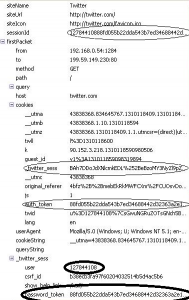
The importance piece of data a hacker will look for is the session cookie associated with a single account on a particular website. A hacker can then simply inject this session cookie into their browser and avoila, they are now on your account, allowing them to “frape” you are maybe do some serious damage, unless a hacker manages to gain access to the passwrod you send though, they shouldn’t be able to change your settings, as twitter requires you to confirm the changes by entering a password.
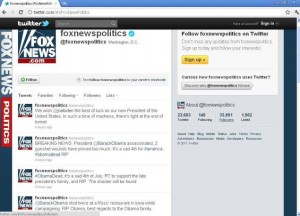
Twitter Security
Securing your Twitter account
Just like facebook, twitter also allows users to use HTTPS, to secure your twitter account (and assuming you are using the new look interface 09/07/2011) just do the following:
Step 1: Log into your twitter account (preferrably on a wired home network, that you know is secure)
Step 2: Click on your username in the top right, a menu will appear, click ‘Account Settings’
Step 3: On the newly loaded page, scroll all the way to the bottom, tick the ‘HTTPS Only‘ checkbox, to ‘Always use HTTPS‘.
Step 4: Click the save button, twitter will then ask you to reenter your password.
That’s it! Your twitter account should now be secured using HTTPS; better twitter security for you. No more session hijacking hackers, your connection will now use Twitters SSL certificate to digitally encrypt all data sent between you and twitter. This is already done by default in Google+ for those of you interested. Here are some of the commonly used sites which can be hijacked within seconds by anyone with a particular firefox extension installed if you are not using HTTPS.
Amazon.com
Basecamp
Bit.ly
Cisco
CNET
Dropbox!
Enom
Evernote
Facebook
Flickr
Foursquare
Github
Google
Gowalla
Hackernews
Harvest
Windows Live
New York Times
Pivital Tracker
Tumblr.com
Twitter
WordPress
Yahoo
Yelp
If you have a website transacting information of which you would like to make secure, do contact us by filling out our enquiry form on www.textmimedia.com and we will provide you with a secure solution for your website.